🤳
For iPhone and Android
Wake up.
Actually get up.
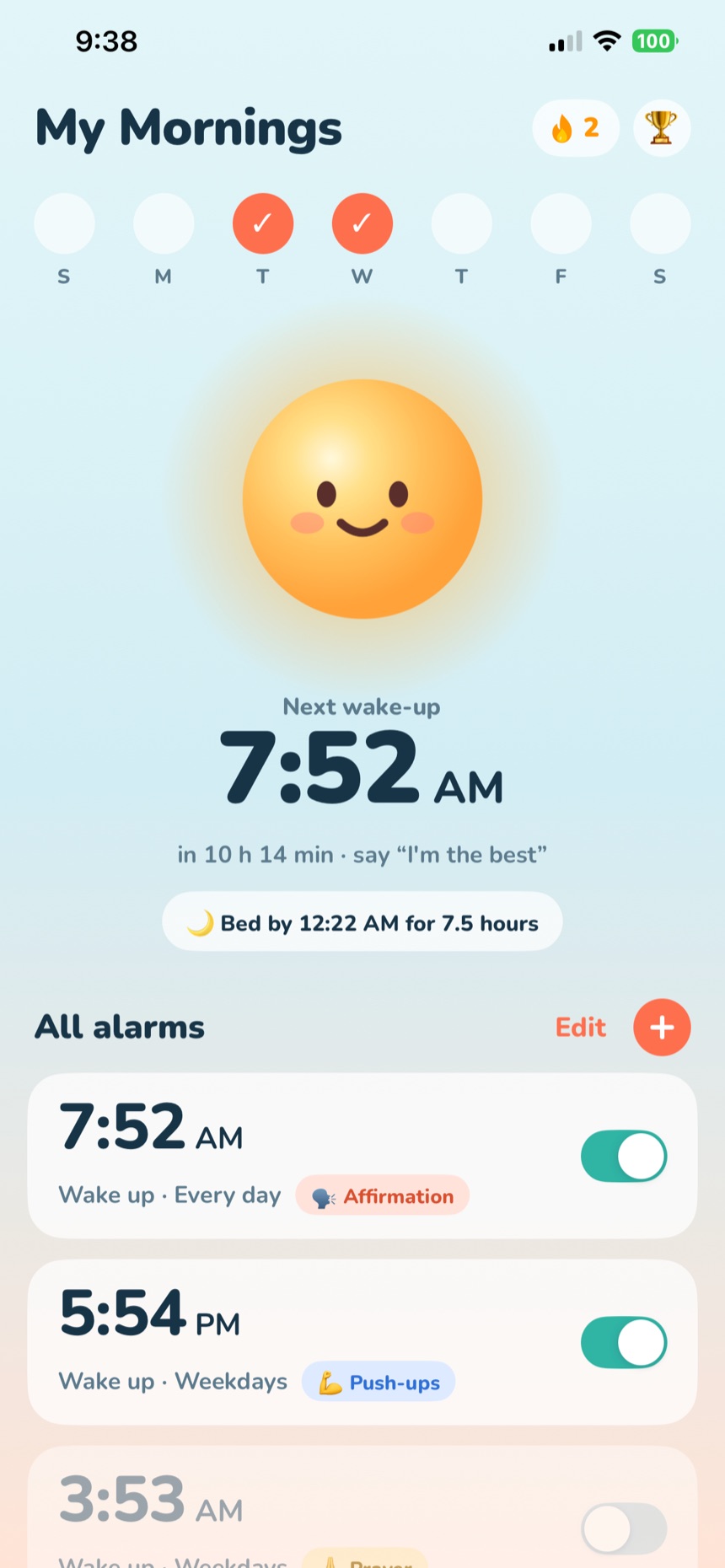
My Mornings is an alarm that keeps ringing until you finish a small morning mission. Smile for a selfie, read a prayer, solve a sum, dance, knock out a few push-ups or walk it off. Then the day is yours.
Download for AndroidAPK file
Coming soon to theApp Store
Coming soon toGoogle Play
See how it works →
- 🔔 Rings through silent mode
- 🔒 No account, no ads
- 🔥 A streak worth protecting
Tap me
7wake-up missions
6selfie posters
7faith traditions in the prayer library
0accounts, sign-ups or ads
Wake-up missions
Snoozing is easy. This isn't.
Choose a mission for each alarm. The alarm comes back every minute until it's done, so there's no swiping it away and falling back asleep.
🙏
Prayer
🧮
Maths
💪
Push-ups
💃
Dance
🚶
Walk
🌀
Spin
How it works
Three steps to a morning you keep
-
1
Set your wake-up
Pick a time and the days it repeats. My Mornings also tells you what time to go to bed for the sleep you want.
-
2
Choose a mission
Selfie, prayer, maths, push-ups, dance, walk or spin. Then choose the sound you want to wake up to.
-
3
Rise and finish it
The alarm rings even on silent. Finish your mission to switch it off and add a day to your streak.
Morning selfie
Your morning, on the front page
Smile and the selfie takes itself. Then it becomes one of six joke posters, made from your face and your morning: what time you got up and how many times you hit snooze. Keep it, save it to Photos, or let it go when you start your day.
Breaking news
“Local human wakes up at 6:42 AM”
Smile, flash, and your day has a headline.
Prayer library
A morning prayer from your tradition
A small library of morning prayers, each shown in its original script with a transliteration and meaning. You can also add your own words.
- HinduismKaragre Vasate · Gayatri Mantra · Mahamrityunjaya Mantra · Vishnu Mantra
- IslamDua on Waking · Al-Fatiha · Ayat al-Kursi
- ChristianityThe Lord’s Prayer · This Is the Day · Glory Be
- SikhismMool Mantar · Japji Sahib
- BuddhismThree Refuges · Metta
- JainismNamokar Mantra
- Spiritual, not religiousGratitude Pause · Morning Intention
Streaks & achievements
Every morning counts
Finish a mission and your flame grows. Keep going to earn medals. They go by your best streak ever, so a missed day never takes one away.
🔥7day streak
- ☀️First Light1 day
- 🌅Three Sunrises3 days
- 📅Full Week7 days
- 💪Two Weeks Strong14 days
- 🌕Month of Mornings30 days
- 🌄Sixty Sunrises60 days
- 🏆Hundred Mornings100 days
The Mood Sun
A little sun that keeps you company
The sun on your home screen changes through the day. It yawns at dawn, smiles in the morning, puts on sunglasses at noon, relaxes in the evening and becomes a sleepy moon at night. Tap it and it wobbles.
Private by design
Your mornings stay on your phone
📷
Camera stays local
Push-ups and dance are judged from the live camera on your phone. Video is never saved or uploaded.
🤳
Selfies stay yours
Your selfie stays on your phone and is cleared when you start your day. It only goes to Photos if you tap Save.
🙅
No account
No sign-up, no email and no ads. Your alarms and streak are stored on your device.
FAQ
Questions, answered
Will the alarm ring if my phone is on silent?
Yes. On iPhone, My Mornings uses Apple's AlarmKit, the same system the Clock app uses. On Android, it rings the way the Clock app does, as an alarm with its own ringing screen. Either way, alarms ring on silent, on the Lock Screen and even after you close the app.
What happens if I dismiss the alarm without doing the mission?
It comes back. Until the mission is finished, the alarm rings again every minute and the home screen reminds you that your wake-up task is waiting.
Which phones does it work on?
Any iPhone running iOS 26 or later (AlarmKit, which lets alarms break through silent mode, arrived with iOS 26), and Android phones running Android 7.0 or later.
Does the app record me or save my camera feed?
No. Push-ups and dance are judged from the live camera on your phone, and that video is never saved. Your morning selfie stays on your phone unless you save it to Photos. Nothing is ever sent to us.
Can I write my own prayer?
Yes. Add your own words alongside the built-in prayers.
How is my streak counted?
Each morning you finish a mission adds a day. Miss a day and the flame resets, but any medals you've earned are yours to keep.
Is there an Android version?
Yes. You can download the Android app as an APK file from this page right now. It's coming to Google Play soon, with the same missions, streaks and medals.
How do I install the APK?
On your Android phone, tap Download for Android and open the file when it finishes. If Android asks, allow your browser to install unknown apps (Settings → Apps → your browser → Install unknown apps), then tap Install. When My Mornings arrives on Google Play you can switch to that version.
When is the iPhone version coming?
Soon. My Mornings is on its way to the App Store. Check back here for the download link.
Tomorrow starts tonight.
Set your first alarm in under a minute.